Saturday, 24 October 2015

Class

# include<iostream>
using namespace std;
class cal
{
//Data Members
int a,b,add,sub,mil,divide;
public:
cal()//Constructor
{
a=b=add=sub=mil=divide=0;
}
//Functions
void addition()
{

 add=a+b;
cout<<"The total is"<<add<<endl;

}
void subtraction()
{

if(a>b)
{
sub==a-b;
}
else
{
sub=b-a;
}
cout<<"Subtraction result  is" <<sub<<endl;

}
void multiplication ()
{

mil=a*b;
cout<<"Multiply is "<<mil<<endl;

}
void division()
{

if(a>b)
divide=a/b;
else
divide=b/a;

cout<<"The Divisior is  "<<divide<<endl;
}
};
void main()
{
cal c;
cout<<"Enter First number"<<endl;
cin>>c.a;
cout<<"Enter Second Number"<<endl;
cin>>c.b;

c.addition();
c.subtraction();
c.multiplication ();
c.division();

}
In this program we will discuss what is class and why we need it??

Class:

class in C++ is a user defined type or data structure declared with keyword class that has data and functions (also called methods) as its members whose access is governed by the three access specifiers privateprotected or public (by default access to members of a class is private). A class (declared with keyword class) in C++ differs from a structure (declared with keyword struct) as by default, members are private in a class while they are public in a structure. The private members are not accessible outside the class; they can be accessed only through methods of the class. The public members form an interface to the class and are accessible outside the class. Instances of these data types are known as objects and can contain member variablesconstantsmember functions, and overloaded operators defined by the programmer.

Syntax:

class
{
//Generally,Data Members are kept private ,so that they can only be access inside of class
Data Members;
//Generally functions are kept public so that they can be used outside of the class.
Functions

};

In this program,we are making a simple calculator.There is one class named cal having some data members and some functions(Which are accessed outside of class using object) ....

Constructor:
Constructor is a function which is automatically called by object,when object is initialized ,In constructor we can initialized variables and other related things if require,If the Constructor is not defined,C++ can make constructor itself but body is empty.It is normally used to initialized  variables.


Note that,Here data members are not declared private but they cant accessed outside of class because until we can define any access identifier ,any variable or function will be by-default private,

Any Suggestions or help ,plz comment.
Thanks


Sunday, 8 December 2013

Structures

# include<iostream>
using namespace std;
struct student
{
char name[10];
int r;
float m;
};
void main()
{
student s;
cout<<"Enter name"<<endl;
cin>>s.name;
cout<<"Enter Roll number"<<endl;
cin>>s.r;
cout<<"Enter Marks"<<endl;
cin>>s.m;
cout<<"Name is"<<s.name<<endl;
cout<<"Roll number is"<<s.r<<endl;
cout<<"Marks is"<<s.m<<endl;
}

In this program,we will discuss Structures........!!

First,What is the Structure is??Why we need it??

Structures:-
Structures are a way of storing many different values in variables of potentially different types under the same name. This makes it a more modular program, which is easier to modify because its design makes things more compact. Structs are generally useful whenever a lot of data needs to be grouped together--for instance, they can be used to hold records from a database or to store information about contacts in an address book. In the contacts example, a struct could be used that would hold all of the information about a single contact--name, address, phone number, and so forth.

I think now,you got is what the structure is......!!

Syntax:-
struct structurename
{
only data types not functions
};

Note:-
before using structure,you will first make it and then use it........!!It will be not make in any function...!!


In this program,we will make a student structure and make dattypes of  name,roll number and marks.....!!
In main,we will make an object of student(structurename) and enter name and other things in it......!!
s.name mean using s we will assign name,and so on......!!

Then,after we will printing name and other datatypes using s.......!!


Here,you will make your own Datatype like int,float but in your datatype student there is one char,one int and one float........!!

I think you got it.........!!!

Feel free to give suggestions in comment box.......! 


Function by Reference

#include <iostream>
using namespace std;
void swap(int &a, int &b);
int main ()
{
  int a,b,z;
  cout<<"Enter First Number"<<endl;
  cin>>a;
  cout<<"Enter Second Number"<<endl;
  cin>>b;
  cout<<"Numbers before Swapping"<<endl;
  cout<<a<<endl<<b<<endl;
  swap(a,b);
  cout<<"Numbers after Swapping"<<endl;
  cout<<a<<endl<<b<<endl;
}
void swap(int &a, int &b)
{
int c;
c=a;
a=b;
b=c;
}

In this,we will discuss sending data by reference......!!
But,First you will knowm what the difference b/w Calling function by Value and
Calling function by Reference......!!
Call by Value:-
1)Call by value passes the value of actual parameter to formal parameter
2)The actual and formal parameters refer to different memory locations.
3)Any change made by function in formal parameter does not affect the value of Actual parameter.
4)It Requires more Memory.
5)It is less Efficient.
Call By Reference:-
1)Call by Reference passes the address of actual parameter to formal parameter.
2)The actual and formal parameters refer to same memory locations.
3)Any change made by function in formal parameter actually changes the value of Actual parameter.
4)It Requires Less Memory.
5)It is more Efficient.

Now,I think you known Whats the difference b/w..............!!!
In this program,we will simply geting two numbers from users and then displaying it,and afterthat we call the function swap() and it will swap these two numbers(mean a is put to b and b is put to a).......!!!
Note:-
If you want to type your function after main,then you will always tell the compiler that a function name this will be using in this program like in this case....!!
What the swap() function is doing.....??
We will send int a,b to it,but on other side(function side) there are pointers which will save there addresses respectively........!!
And its done...!
If we give,
a=2;
b=3;
After swapping it will be,
a=3;
b=2;


I think you got it.........!!!

Feel free to give suggestions in comment box.......! 

Pointers


#include <iostream>
using namespace std;

int main ()
{
  int a = 5,b = 15;
  int *p1, *p2;

  p1 = &a;             // p1 = address of firstvalue
  p2 = &b;             // p2 = address of secondvalue          
  cout<<*p1<<endl<<a<<endl;
  cout<<"*p2<<b<<endl;
  cout<<&a<<p1<<endl;
  cout<<&b<<p2<<endl;
 
  
}


In this,we will discuss pointers......!
So,first we known what are pointers.....!!
Pointers:-
Pointers are an extremely powerful programming tool. They can make some things much easier, help improve your program's efficiency, and even allow you to handle unlimited amounts of data. For example, using pointers is one way to have a function modify a variable passed to it. It is also possible to use pointers to dynamically allocate memory, which means that you can write programs that can handle nearly unlimited amounts of data on the fly--you don't need to know, when you write the program, how much memory you need. Wow, that's kind of cool.


In this program,we will take two int,a and b and two pointers,p1 and p2 of int type.....!!
When we assign p1=&a,we will giving p1 address of a and same case with p2.....!!
and then we will printing out *p1,which will print the value which we give to a .....!!
How's this possible.......Actually,p1 is pointing to a(not to its value) and *p1 means what the value of a is........!!

And if we print &a it will print the address of a,and if we print p1 it will also printing the address(These two addresses are same) and same case with p2 and b......!!

I think you got it.........!!!
Feel free to give suggestions in comment box.......! 

Wednesday, 4 December 2013

Return Function

#include <iostream>
using namespace std;
int addition (int a, int b)
{
  int r;
  r=a+b;
  return r;

}

int main ()
{
  int a,b,z;
  cout<<"Enter First Number"<<endl;
  cin>>a;
  cout<<"Enter Second Number"<<endl;
  cin>>b;
  z=addition(a,b);
  cout <<"The result is"<<z;

 
}
In this program,We will discuss Return  Function....!!
 first of all remember something said at the beginning of this tutorial: a C++ program always begins its execution by the main function. So we will begin there.

We can see how the main function begins by declaring the variable z of type int. Right after that, we see a call to a function called addition. Paying attention we will be able to see the similarity between the structure of the call to the function and the declaration of the function itself some code lines above: 


The parameters and arguments have a clear correspondence. Within the main function we called to additionpassing two values: 5 and 3, that correspond to the int a and int b parameters declared for function addition.

At the point at which the function is called from within main, the control is lost by main and passed to functionaddition. The value of both arguments passed in the call (5 and 3) are copied to the local variables int a and int b within the function.

Function addition declares another local variable (int r), and by means of the expression r=a+b, it assigns to rthe result of a plus b. Because the actual parameters passed for a and b are 5 and 3 respectively, the result is 8.

The following line of code:

return r;
finalizes function addition, and returns the control back to the function that called it in the first place (in this case,main). At this moment the program follows its regular course from the same point at which it was interrupted by the call to addition. But additionally, because the return statement in function addition specified a value: the content of variable r, which at that moment had a value of 8. This value becomes the value of evaluating the function call.   So being the value returned by a function the value given to the function call itself when it is evaluated, the variable z will be set to the value returned by addition (5, 3), that is 8. To explain it another way, you can imagine that the call to a function (addition (5,3)) is literally replaced by the value it returns (8).
I think you got it.........!!!
Feel free to give suggestions in comment box.......!

Parameterized Function

#include <iostream>
using namespace std;
void addition (int a, int b)
{
  int r;
  r=a+b;
  cout <<"The result is" <<r;

}

int main ()
{
  int a,b;
  cout<<"Enter First Number"<<endl;
  cin>>a;
  cout<<"Enter Second Number"<<endl;
  cin>>b;
  addition(a,b);
 
}
In this program,We will discuss Parameterized Function
A Parameterized Function is the Function,which will recieve parameters from any  other function(Main is also a function).
we will enter two numbers and these two numbers will save in a and b(Type int),
then we will send these two numbers to addition function,which will add these two numbers and display there result.......!!
Note:-


As shown in figure,a will be send to x,b will be send to y and c will be send to z  respectively and in our case a will be send to a and b will be send to b...!!
The a and b,which we will sending from the main is the data type of main,and,a and b which is recieving these two are data types of addition function......!!

Function

# include<iostream>
using namespace std;
void dis()
{
cout<<"I am the Display function"<<endl;
}
void main()
{
cout<<"This program is calling the function"<<endl;
dis();
}

In this program,
We will discuss function:-
What is a Function??
A function is a group of statements that is executed when it is called from some point of the program. 

Using functions we can structure our programs in a more modular way, accessing all the potential that structured programming can offer to us in C++.

The following is its format:

type name ( parameter1, parameter2, ...)
statements 
}

In the type name,we will enter type such as int float,char etc....!
It is used when the function can return some thing like some value,some character etc.
If we want,a function cannot return some thing then will will put "void",in type.This type is also known as return type
Next,is the function name,It will be any name....In this case,function name is dis!!
Next,Is the parameters,The parameters is the value which we are sending to the function like It may be int,float,char etc.....And there will be as many parameteres as you want in your function.
In this program,we will simply call dis() function and others things I think you got earlier.....!!
Feel free to give suggestions in comment box.......!

Wednesday, 20 November 2013

If else if Statements

# include<iostream>
using namespace std;
void main()
{
cout<<"Enter any number";
cin>>a;
if(a==0)
cout<<"value of a is o"<<endl;
else if(a==2)
cout<<"Value of a is 2"<<endl;
else if(a==3)
cout<<"Value of a is 3"<<endl;
else
 cout<<"Value of a is not 0,2 and 3"<<endl;

}

In this program,
we will take value from user,the value user gives is store in a(data type int)
If the user give inout o(zero),then the program says that:-
"Value of a is o".......!!
How is this possible,Actually if statement is a check which will check either value of a is zero nor not..!
If it is zero then Program says that,Valus is zero.....!
But if value of a is 2,then the command transfers to thie statement and this statement is printed:-
"Value of a is 2"...!
and if the user gives value of  a is 3,then the command transfers to thie statement and this statement is printed:-
"Value of a is 3"...!
but if it is not zero then the command transfers to the else,and the program says,
"Value of a is not zero"..!
Note:-
If you want one statement to be executed with if and else,then no need to place braces(show in program),but if two or more statements are,then you will put braces,(Explain in this link:-http://jdrana.blogspot.com/2013/11/if-else-statement.html)
I hope you wil got this..!
Feel free to give suggestions in comment box.......!

If else Statement

# include<iostream>
using namespace std;
void main()
{
cout<<"Enter any number";
cin>>a;
if(a==0)
cout<<"value of a is o"<<endl;
else
cout<<"Value of a is not zero"<<endl;

}

In this program,
we will take value from user,the value user gives is store in a(data type int)
If the user give inout o(zero),then the program says that:-
"Value of a is o".......!!
How is this possible,Actually if statement is a check which will check either value of a is zero nor not..!
If it is zero then Program says that,Valus is zero.....!
but if it is not zero then the command transfers to the else,and the program says,
"Value of a is not zero"..!
Note:-
If you want one statement to be executed with if and else,then no need to place braces(show in program),but if two or more statements are,then you will put braces like this:-
if(a==0)
{
cout<<"I am Junaid"<<endl;
cout<<"Value of a is o"<<endl;
}
else
{
cout<<"I am Rana"<<endl;
cout<<"Value of a is not zero"<<endl;
}
I hope you wil got this..!
Feel free to give suggestions in comment box.......!

If statement

# include<iostream>
using namespace std;
void main()
{
cout<<"Enter any number";
cin>>a;
if(a==0)
cout<<"value of a is o"<<endl;

}

In this program,
we will take value from user,the value user gives is store in a(data type int)
If the user give inout o(zero),then the program says that:-
"Value of a is o".......!!
How is this possible,Actually if statement is a check which will check either value of a is zero nor not..!
If it is zero then Program says that,Valus is zero.....!
Note:-
If you want one statement to be executed with if,then no need to place braces(show in program),but if two or more statements are,then you will put braces like this:-
if(a==0)
{
cout<<"I am Junaid"<<endl;
cout<<"Value of a is o"<<endl;
}
I hope you wil got this..!
Feel free to give suggestions in comment box.......!

Thursday, 7 November 2013

Do While Loop

Practise Programe of  Do While Loop.
 
# include<iostream>
using namespace std;
void main()
{
int a,b;
char ch;
do
{
cout<<"Enter a";
cin>>a;
cout<<"Enter b";
cin>>b;
a=a+b;
cout<<"output is"<<a<<endl;
cout<<"Are you want to continue"<<endl;
cin>>ch;
}
while(ch=='Y'||ch=='y');
}

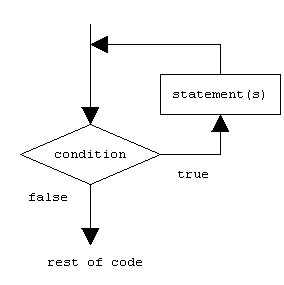
The basic difference b/w while and do while loop is,do while loop enters into its body first time if its condition is wrong.........!
Syntax:-
"do",will come at the start.....!
"do" means,Commands in loop body will be executed whatever the condition is(either it is right or wrong).
and while at the end.......!
so,the program first ask user to enter two numbers and then display the result.......!
Then,after it will ask whether you want to continue the program or not?
if you enter Y or small y then it will again ask you to enter two numbers and so on.....!
but if you enter any other character(rather then Y or y),then the program stops(mean loop end)...!
Note that,in do while loop semi colon is place after while......!

While Loop

# include<iostream>
using namespace std;
void main()
{
int a;
a=0;
while(a<=10)
{
cout<<a<<endl;
a++;
}
}

This program is same as http://www.jdrana.blogspot.com/2013/10/include-include-void-main-int-i-fori0i.html......!
but this is done with the help of while loop
The while condition if tress control enter into while loop body,otherwise not.......!
As,For and while loop dones same thing,but While loop has its own space in c++ which we will discuss later........!
Output is:-
0
1
2
3
4
5
6
7
8
9
10
Note that 10 will also be printed because a is equal to 10....!
Feel free to give suggestions in comment box.......!
F

Monday, 28 October 2013

Table in c++ with help of For loop

# include<iostream.h>
using namespace std;
void main()
{
int a,i;
cout<<"Enter Number";
cin>>a;
for(i=1;i<=10;i++)
{
cout<<a<<"*"<<i<<"="<<a*i<<endl;
}

}

Now,
We will explain this program,
First we take two integers,(Find all data members ranges at:-http://www.jdrana.blogspot.com/2013/10/add-numbers-in-c.html)
then we will take one input from user and save it in a variable,
When for loop starts ,i is equal to one ,then condition is check and 1 is less then 10 so for loop enters into its body and prints,
(Consider we will give input 2)
2*1=2
then control goes to next line due to endl(endl is used for one line space)
then i will be incremented and condition is again check
(How For loop works:-http://www.jdrana.blogspot.com/2013/10/include-include-void-main-int-i-fori0i.html)
So,
the Output is:-
2*1=2
2*2=4
2*3=6
2*4=8
2*5=10
2*6=12
2*7=14
2*8=16
2*9=18
2*10=20
Fell free to give Suggestions.......!

Wednesday, 23 October 2013

For Loop

# include<iostream>
# include<conio.h>
void main()
{
int i;
for(i=0;i<9;i++)
cout<<"i am JD";

}
In this program,we will discuss how for loop works in c++......!
for(i=0;
what is this??
here we simply declare i to 0...
then we i<9
this is condition this for loops works when i is less then 9
and at last i++;
this is the increment operator we discuss in previous post...
first i will become zero then the condition will check if the condition is true then the loop prints whatever type in next line or compiler will do what is on next line.....!
Note:
if single line you want to execute with for loop then brackets cannot be needed,but if you make two lines or more then,then to execute with for loop then you will put brackets ....)
after doing what is in the brackets(if two or more lines are),then the loop go to the last one(i++),here i will be incremented and then i will become 1 then a condition will again check either it is less thhen 9 or not.if it is,then loop body will execute otherwise not...
Output is:-
i am JD
i am JD
i am JD
i am JD
i am JD
i am JD
i am JD
i am JD
i am JD
i am JD
Fell free to give suggestions in comment box

Increment and decrement

# include<iostream>
using namespace std;
void main()
{
int a;
cout<<"Enter a";
cin>>a;
a++;
cout<<a;
a--;
cout<<a;
}
here we will take any value from the user and that value is save in a...
then a will be incremented
Incremented mean to add one more to some variable like here a++ mean if a==1 then after incremented a will be 2...
after printing a on screen a will be decremented like a--;
Decremented mean to minus one to some variable like here a-- if a==2 ten after decremented a will be 1;
Your Suggestions will help us,so plz give suggestions in comment box
or feel free to share any problem

Saturday, 19 October 2013

Add numbers in C++

# include<iostream>
using namespace std;
void main()
{
int a,b,c;
cout<<"enter first number"<<endl;
cin>>a;
cout<<"Enter second number";
cin>>b;
c=a+b;
cout<<"The sum is"<<c<<endl;
}
here,
int is used for  integer (positive and negative)type....
here are all c++ data types and there ranges
signed char: -127 to 127 (note, not -128 to 127; this accommodates 1's-complement platforms)
unsigned char: 0 to 255
"plan" cha: -127 to 127 or 0 to 255 (depends on default char signedness)
signed short: -32767 to 32767
unsigned short::0 to 65535
signed int: -32767 to 32767
unsigned int: 0 to 65535
signed long:-2147483647 to 2147483647
unsigned long 0 to 4294967295
signed long long: -9223372036854775807 to 9223372036854775807
unsigned long long:0 to 184467440737095516
then,
cin is used for saving the required data type a value.
and 
c=a+b;
if a=4,b=4;
then c=8;
so,the answer is 8
Plz like my blog and feel free for suggestions

Learn Programming in c++

# include<iostream>uisng namespace std;void main(){cout<<"I am JD"<<endl;}
here

# 

is used for the folder location(c++ compiler automatically known where headers files is)
include is used to inculde some header file in your program(we willl discuss later what is header file)
iostream is the header file.....
It is used for cin & cout etc etc.....
using namespace std;
Namespaces are like drawers in a filing cabinet. All of the standard library is in one drawer, and the only way to get to the stuff in that drawer is to tell C++ where to find it. You do that by prefixing the name with std,
std::cout is basically like saying "Hey C++! Look in  and get me cout, asap!". If you don't tell C++ which drawer to look in, it won't find what you want.
simply,this is used for declaring cin & cout ...
void main()
This is essential for any  c++ program(either it is console application or win32 application)
this is the starting point for any program,without this program the compiler cannot known where to start compling the program....
{
}
left and right braces are used for boundary line of your program...as in football there is a boundary so c and c++  has braces for that
cout
this is used for printing any thing in screen(only for console apps)
the thing which is in inverted commas can be printed..the compile cannot compile inverted commas inner side
this "<<" is,I mean is a operator to print anything on screen as operator for addition is + etc....
endl is used for having a one line space
Plz like my blog and feel free for suggestions